15 February, 2013

MySQL CONCAT address into string seperated by comma

CONCAT_WS() does not skip empty strings. However, it does skip any NULL values after the separator argument.

NULLIF(expr1,expr2) Returns NULL if expr1 = expr2 is true, otherwise returns expr1.
SO your query could be:

SELECT 
  CONCAT_WS(', ', 
       NULLIF(location_address1, ''),
       NULLIF(location_address2, ''),
       NULLIF(location_town, ''), 
       NULLIF(location_region, ''), 
       NULLIF(location_postcode, ''), 
       NULLIF(country_name, '')
  ) AS address
FROM
   countries c      
WHERE
   c.country_id = locations.country_id LIMIT 1

11 February, 2013

Unable to load one or more of the requested types. Retrieve the LoaderExceptions property for more information

Problem:
Unable to load one or more of the requested types. Retrieve the LoaderExceptions property for more information.

Solution:
To know in details what exactly happen add one more catch block like below.

catch (ReflectionTypeLoadException ex)
{
    StringBuilder sb = new StringBuilder();
    foreach (Exception exSub in ex.LoaderExceptions)
    {
        sb.AppendLine(exSub.Message);
        if (exSub is FileNotFoundException)
        {
            FileNotFoundException exFileNotFound = exSub as FileNotFoundException;
            if (!string.IsNullOrEmpty(exFileNotFound.FusionLog))
            {
                sb.AppendLine("Fusion Log:");
                sb.AppendLine(exFileNotFound.FusionLog);
            }
        }
        sb.AppendLine();
    }
    string errorMessage = sb.ToString();
    //Display or log the error based on your application.
}

23 January, 2013

Full Screen in Visual Studio

Keyboard Shortcut:  SHIFT + ALT + ENTER
Using Menu:  View -> Full Screen
Command:  View.FullScreen
Visual Studio Versions:  2008, 2010


Before Full Screen Mode


 After Full Screen Mode


10 January, 2013

SQL SERVER – Fix : Error : 8501 MSDTC on server is unavailable. Changed database context to publisherdatabase


During configuring replication on one of the server, I received following error. This is very common error and the solution of the same is even simpler.
MSDTC on server is unavailable. Changed database context to publisherdatabase. (Microsoft SQL Server, Error: 8501)

Solution:
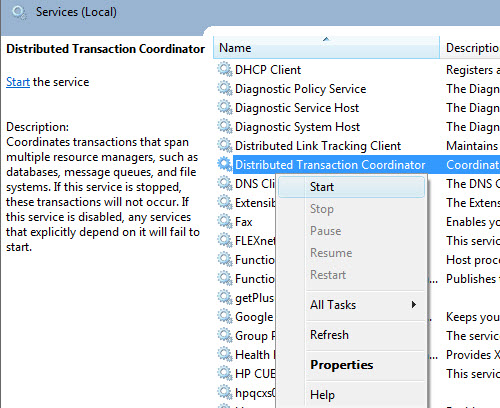
Enable “Distributed Transaction Coordinator” in SQL Server.
Method 1:
  1. Click on Start–>Control Panel->Administrative Tools->Services
  2. Select the service “Distributed Transaction Coordinator”
  3. Right on the service and choose “Start”
Method 2:
  1. Type services.msc in the run command box
  2. Select “Services” manager; Hit Enter
  3. Select the service “Distributed Transaction Coordinator”
  4. Right on the service and choose “Start”


Reference : Pinal Dave (http://blog.SQLAuthority.com)

25 December, 2012

Maximum characters of varchar max in sql server

Maximum 2^31-1 byte (2GB).

[2,147,483,647] Character

1 character = 1 byte


Variable-length, non-Unicode string data. n defines the string length and can be a value from 1 through 8,000. max indicates that the maximum storage size is 2^31-1 bytes (2 GB). The storage size, in bytes, is the value of the actual data entered + 2 bytes. The ISO synonyms for varchar are char varying or character varying.

Ref:

15 December, 2012

Remove Scrollbar from Textarea in IE

By default all versions of IE have a scrollbar on textareas, even when they are empty.


No other browsers do this, so if you want to remove it so IE can visually match other browsers, just:

textarea { overflow: auto; }

The scrollbar will return (rightfully) when the text in the textarea expands beyond it's bounds.


soruce:
http://css-tricks.com/snippets/css/remove-scrollbar-from-textarea-in-ie/

13 December, 2012

Disable Process Attach Warning in Visual Studio 2010

Problem:

We often debugging and we need to attach process like w3wp.exe, service process or any process in visual studio.Visual studio every time asks warning like "Attaching to this process can potentially harm your computer. If the information below looks suspicious or your are unsure, do not attach to this process."


We know that this process is not harmful and we want to disable that warning right?

Solution:

1. Close all instances of visual studio.
2. Update registry value:

HKEY_CURRENT_USER\Software\Microsoft\VisualStudio\10.0\Debugger
And set the value DisableAttachSecurityWarning to 1
OR
if you don't want to find registry and update value manually then just download this registry file from here and just open this file.