28 March, 2013

How to check date is valid or not in Javascript

Features:
 
  • Date format: MM/DD/YYYY
  • Text box control values can be validated as correct date
  • Month can be entered compulsory with two digits either 0 or 1 as first digit. So possible invalid entries are from 13 to 19.
  • Date can be entered compulsory with two digits either 0,1,2 or 3 as first digit. So possible invalid entries are from 32 to 39.
  • Entry will be validated on blur event. In case of invalid date then blank TextBox.
  • It will also validate for Leap years for Feb month. Also, it will validate 31 date for April, June, Sep & Nov months.

JavaScript Function:

function isDate(txtDate) {
    var currVal = txtDate.val();
    if (currVal == '') {
        txtDate.val('');
        return false;
    }
 
    //Declare Regex 
    var rxDatePattern = /^(\d{1,2})(\/|-)(\d{1,2})(\/|-)(\d{4})$/;
    var dtArray = currVal.match(rxDatePattern); // is format OK?
 
    if (dtArray == null) {
        txtDate.val('');
        return false;
    }
 
    //Checks for mm/dd/yyyy format.
    dtMonth = dtArray[1];
    dtDay = dtArray[3];
    dtYear = dtArray[5];
 
    if (dtMonth < 1 || dtMonth > 12) {
        txtDate.val('');
        return false;
    }
    else if (dtDay < 1 || dtDay > 31) {
        txtDate.val('');
        return false;
    }
    else if ((dtMonth == 4 || dtMonth == 6 || dtMonth == 9 || dtMonth == 11) && dtDay == 31) {
        txtDate.val('');
        return false;
    }
    else if (dtMonth == 2) {
        var isleap = (dtYear % 4 == 0 && (dtYear % 100 != 0 || dtYear % 400 == 0));
        if (dtDay > 29 || (dtDay == 29 && !isleap)) {
            txtDate.val('');
            return false;
        }
    }
    return true;
}

20 March, 2013

Check Foreign key exists in MySQL

If you want to add/drop foreign key then you need to check is foreign key is exist or not.

IF NOT EXISTS (SELECT NULL FROM information_schema.TABLE_CONSTRAINTS WHERE
                   CONSTRAINT_SCHEMA = DATABASE() AND
                   CONSTRAINT_NAME   = 'fk_rabbits_main_page' AND
                   CONSTRAINT_TYPE   = 'FOREIGN KEY') THEN
   ALTER TABLE `rabbits` ADD CONSTRAINT `fk_rabbits_main_page`
                             FOREIGN KEY (`main_page_id`)
                             REFERENCES `rabbit_pages` (`id`);
END IF
 
 
Using following query you will get more information about foreign key with column details.
 
 SELECT 
    TABLE_NAME,COLUMN_NAME,
    CONSTRAINT_NAME,
    REFERENCED_TABLE_NAME,
    REFERENCED_COLUMN_NAME 
FROM 
    INFORMATION_SCHEMA.KEY_COLUMN_USAGE 
WHERE 
    TABLE_NAME='TABLENAME' 
    AND REFERENCED_TABLE_NAME = 'REFERENCED_TABLE_NAME' 
    AND CONSTRAINT_NAME='FK_Key_Name'
    AND REFERENCED_COLUMN_NAME='Code'; 

27 February, 2013

Removing a Server name from MS SQL Server Management Studio 2008 'Connect to Server' Drop-down list


Download utility from http://ssmsmru.codeplex.com/

OR

Rename Or Delete following file.

In Windows 7, it's in the following:

SQL 2005:
C:\Users\<USER>\AppData\Roaming\Microsoft\Microsoft SQL Server\90\Tools\Shell\mru.dat

SQL 2008:
C:\Users\<USER>\AppData\Roaming\Microsoft\Microsoft SQL Server\100\Tools\Shell\SqlStudio.bin


In Windows XP, it's in the following:

SQL 2005:
C:\Users\<USER>\AppData\Roaming\Microsoft\Microsoft SQL Server\90\Tools\Shell\mru.dat

SQL 2008:
C:\Users\<USER>\AppData\Roaming\Microsoft\Microsoft SQL Server\100\Tools\Shell\SqlStudio.bin

15 February, 2013

MySQL CONCAT address into string seperated by comma

CONCAT_WS() does not skip empty strings. However, it does skip any NULL values after the separator argument.

NULLIF(expr1,expr2) Returns NULL if expr1 = expr2 is true, otherwise returns expr1.
SO your query could be:

SELECT 
  CONCAT_WS(', ', 
       NULLIF(location_address1, ''),
       NULLIF(location_address2, ''),
       NULLIF(location_town, ''), 
       NULLIF(location_region, ''), 
       NULLIF(location_postcode, ''), 
       NULLIF(country_name, '')
  ) AS address
FROM
   countries c      
WHERE
   c.country_id = locations.country_id LIMIT 1

11 February, 2013

Unable to load one or more of the requested types. Retrieve the LoaderExceptions property for more information

Problem:
Unable to load one or more of the requested types. Retrieve the LoaderExceptions property for more information.

Solution:
To know in details what exactly happen add one more catch block like below.

catch (ReflectionTypeLoadException ex)
{
    StringBuilder sb = new StringBuilder();
    foreach (Exception exSub in ex.LoaderExceptions)
    {
        sb.AppendLine(exSub.Message);
        if (exSub is FileNotFoundException)
        {
            FileNotFoundException exFileNotFound = exSub as FileNotFoundException;
            if (!string.IsNullOrEmpty(exFileNotFound.FusionLog))
            {
                sb.AppendLine("Fusion Log:");
                sb.AppendLine(exFileNotFound.FusionLog);
            }
        }
        sb.AppendLine();
    }
    string errorMessage = sb.ToString();
    //Display or log the error based on your application.
}

23 January, 2013

Full Screen in Visual Studio

Keyboard Shortcut:  SHIFT + ALT + ENTER
Using Menu:  View -> Full Screen
Command:  View.FullScreen
Visual Studio Versions:  2008, 2010


Before Full Screen Mode


 After Full Screen Mode


10 January, 2013

SQL SERVER – Fix : Error : 8501 MSDTC on server is unavailable. Changed database context to publisherdatabase


During configuring replication on one of the server, I received following error. This is very common error and the solution of the same is even simpler.
MSDTC on server is unavailable. Changed database context to publisherdatabase. (Microsoft SQL Server, Error: 8501)

Solution:
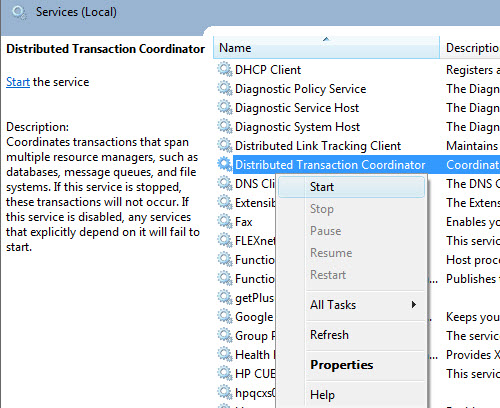
Enable “Distributed Transaction Coordinator” in SQL Server.
Method 1:
  1. Click on Start–>Control Panel->Administrative Tools->Services
  2. Select the service “Distributed Transaction Coordinator”
  3. Right on the service and choose “Start”
Method 2:
  1. Type services.msc in the run command box
  2. Select “Services” manager; Hit Enter
  3. Select the service “Distributed Transaction Coordinator”
  4. Right on the service and choose “Start”


Reference : Pinal Dave (http://blog.SQLAuthority.com)